
What Is an Amazon KDP Keyword Generator and How Does It Help Readers Find Your Book?
An Amazon KDP keyword generator is a tool that helps authors create keyword phrases readers actually type into Amazon search when looking for books like yours. Instead of guessing broad terms or stuffing single words, you can generate long-tail, reader-intent keywords that match real search language and make your book easier to discover.
On Amazon, keywords are not just “SEO words.” They are signals that connect your listing to specific reader needs, formats, and use cases. When your keywords reflect how buyers search—such as “large print sudoku book for seniors”instead of simply “sudoku”—Amazon can place your book in more relevant search results, which often improves both visibility and conversion.
The goal is not to add more words—it is to use the right phrases. A good keyword set balances relevance (your book truly matches the query) with specificity (the query describes a real reader intent). This is why keyword strategy matters just as much as keyword volume.
How Amazon Search Uses Keywords to Connect Readers With Books
Amazon’s search engine tries to match what a reader types with books that appear most relevant to that query. When someone searches for a phrase like“easy sudoku puzzle book for seniors”, Amazon looks for listings whose titles, subtitles, keywords, and descriptions signal that the book matches that exact need.
This means discoverability on Amazon is largely about relevance signals. The clearer your keywords describe the topic, audience, and format of the book, the easier it becomes for the algorithm to place your listing in the right search results.
- Search query matching. Amazon compares the reader’s search phrase with words and phrases inside your listing metadata.
- Relevance ranking. Listings that closely match the query are more likely to appear higher in search results.
- Performance signals. Books that receive clicks, reads, or purchases from those searches can strengthen their ranking over time.
- Keyword clarity. Specific phrases help Amazon understand exactly what type of reader the book is for.
Because of this system, strong keyword phrases are usually specific and descriptive. Instead of broad terms like “journal” or “diet,” effective keywords often look like real reader searches such as “guided anxiety journal for teens” or “keto meal plan cookbook for beginners.”
Why Long-Tail Keywords Usually Work Better for Books
Many new authors try to target very broad keywords such as “diet”,“puzzles”, or “productivity”. These words look popular, but they are also extremely competitive and vague. Amazon cannot easily determine what specific type of book the reader actually wants.
Long-tail keywords solve this problem. These are more specific search phrases that describe the topic, audience, or format of the book. Because they match clearer reader intent, they often lead to better discoverability and higher conversion when readers land on your listing.
| Broad Keyword | Long-Tail Keyword | Why It Works Better |
|---|---|---|
| sudoku | sudoku puzzle book for adults | Describes the exact type of puzzle book |
| diet | keto diet cookbook for beginners | Matches a specific audience and experience level |
| journal | guided anxiety journal for teens | Combines topic, purpose, and audience |
| math workbook | math workbook grade 3 multiplication | Targets a clear school level and topic |
A strong keyword strategy usually combines a few broader phrases with manyspecific long-tail searches. This approach helps Amazon understand what your book is about and increases the chance that the right readers will discover it when browsing or searching the marketplace.
How Amazon Book Keywords Are Built (and How They Affect Search)
Amazon book searches are rarely just one word. Most reader queries are built from a few repeating “building blocks” that Amazon uses to understand relevance. When your listing contains these same building blocks (in your title/subtitle/description and KDP backend keywords), Amazon can match your book to a wider range of related searches without keyword stuffing.
Think of keyword research as assembling a phrase from components. In practice, many high-intent queries follow patterns like: Topic + Audience , Topic + Format , or Topic + Audience + Format + Difficulty/Benefit . The more clearly your listing supports these patterns, the more confidently Amazon can surface your book for relevant searches.
Topic (Core) Keywords
These define what the book is about — the main subject Amazon should associate your listing with.
Examples: sudoku puzzle book, gratitude journal, keto meal prep.
Why it matters: topic keywords create the primary relevance signal and anchor all long-tail variations.
Audience Keywords
These describe who the book is written for — readers often include audience terms in search queries.
Pattern: [topic] for [audience] or [audience] [topic].
Examples: sudoku for seniors, math workbook grade 3, mindfulness journal for teens.
Format Keywords
These describe the structure of the book — readers search by format when they know what experience they want.
Pattern: [format] + [topic] or [topic] + [format].
Examples: large print puzzle book, guided journal, activity workbook, coloring book.
Difficulty / Level Keywords
These express the reader’s skill level or desired challenge. They are common in puzzle books and educational niches.
Pattern: [easy/advanced] + [topic] or [topic] for beginners.
Examples: easy sudoku puzzles, advanced cryptograms, beginner strength training.
Problem / Benefit Keywords
These reflect what the reader wants to solve or gain — often the highest-intent part of a search query.
Pattern: [problem/goal] + [topic] or [topic] for [outcome].
Examples: anxiety relief workbook, memory improvement puzzles, weight loss meal plan.
Use-Case Keywords
These describe when, where, or why readers use the book — they add context and help match niche intent.
Pattern: [topic] for [situation] or [situation] + [topic].
Examples: road trip puzzle book, daily gratitude journal, classroom math practice.
How this affects Amazon search: Amazon tries to match a reader’s query to the most relevant listing. When your listing supports multiple keyword “building blocks,” it can match more variations of the same intent. That increases your chance to appear in search results for related long-tail phrases.
- Relevance comes first: Amazon rewards listings that match the query and convert well for that query.
- Coverage matters: using different building blocks helps you cover more search angles without repeating the same words.
- Natural phrasing wins: keyword stuffing can weaken clarity; clean long-tail phrases reflect how readers actually search.
Where Keywords Matter in an Amazon KDP Book Listing
Keywords influence several parts of your Amazon listing, not just the backend keyword fields inside KDP. Amazon’s search system looks at multiple signals to determine whether a book is relevant to a reader’s search query.
This means your keyword strategy should consider the entire listing structure. Titles, subtitles, and metadata help Amazon understand what your book is about and which readers it should be shown to.
| Listing Element | Role of Keywords | Relative Impact |
|---|---|---|
| Title | Main topic signal. Helps Amazon immediately understand what the book is about. | Very strong |
| Subtitle | Expands context with audience, benefits, or format keywords. | Strong |
| KDP Backend Keywords | Hidden keyword phrases used to capture additional search variations. | Medium |
| Book Description | Provides supporting context and relevance signals for search. | Medium / supporting |
| Amazon Ads Keywords | Used to target search queries and related product pages in ads campaigns. | Paid traffic targeting |
Because these elements work together, effective keyword strategies usually start with a clear topic in the title and subtitle, then expand into additional variations through backend keywords and advertising targeting. This layered approach helps Amazon connect your book with more relevant reader searches.
How to Find Good Amazon Book Keywords (Step-by-Step)
Finding effective KDP keywords is partly research and partly pattern recognition. The goal is to identify phrases readers already use when searching for books like yours, then choose the ones that most clearly describe your topic and audience.
A simple workflow combines market observation with idea expansion. Start with real signals from Amazon, then use tools such as an AI keyword generator to expand those ideas into additional long-tail phrases.
- 1. Start with Amazon autocomplete.
Begin typing your topic in Amazon search and observe the suggested phrases. These suggestions come from real reader searches. - 2. Study competitor titles and subtitles.
Look at successful books in your niche and identify recurring language, audience words, and problem-solution phrases. - 3. Check category and niche terminology.
Category names and common phrases inside your niche often reveal the vocabulary readers use when describing the topic. - 4. Expand ideas with AI.
Once you have a few seed phrases, an AI generator can expand them into dozens of long-tail variations that capture different audiences, formats, and search angles. - 5. Validate before using.
Keep the phrases that naturally appear in the market and clearly match your book’s content. Avoid vague or misleading keywords.
This combination of real market signals + AI expansion usually produces the most reliable keyword lists for Amazon KDP listings and advertising campaigns.
Example: Expanding One Book Idea Into Dozens of Amazon Keyword Phrases
Many authors start keyword research with just one simple idea, such as the topic or format of their book. From this starting point, you can expand into many specific search phrases that reflect different audiences, skill levels, and use cases.
For example, a simple seed phrase like “sudoku puzzle book” can expand into dozens of more descriptive keywords that readers actually type into Amazon search. These variations help Amazon understand the exact context of the book and match it with more specific reader queries.
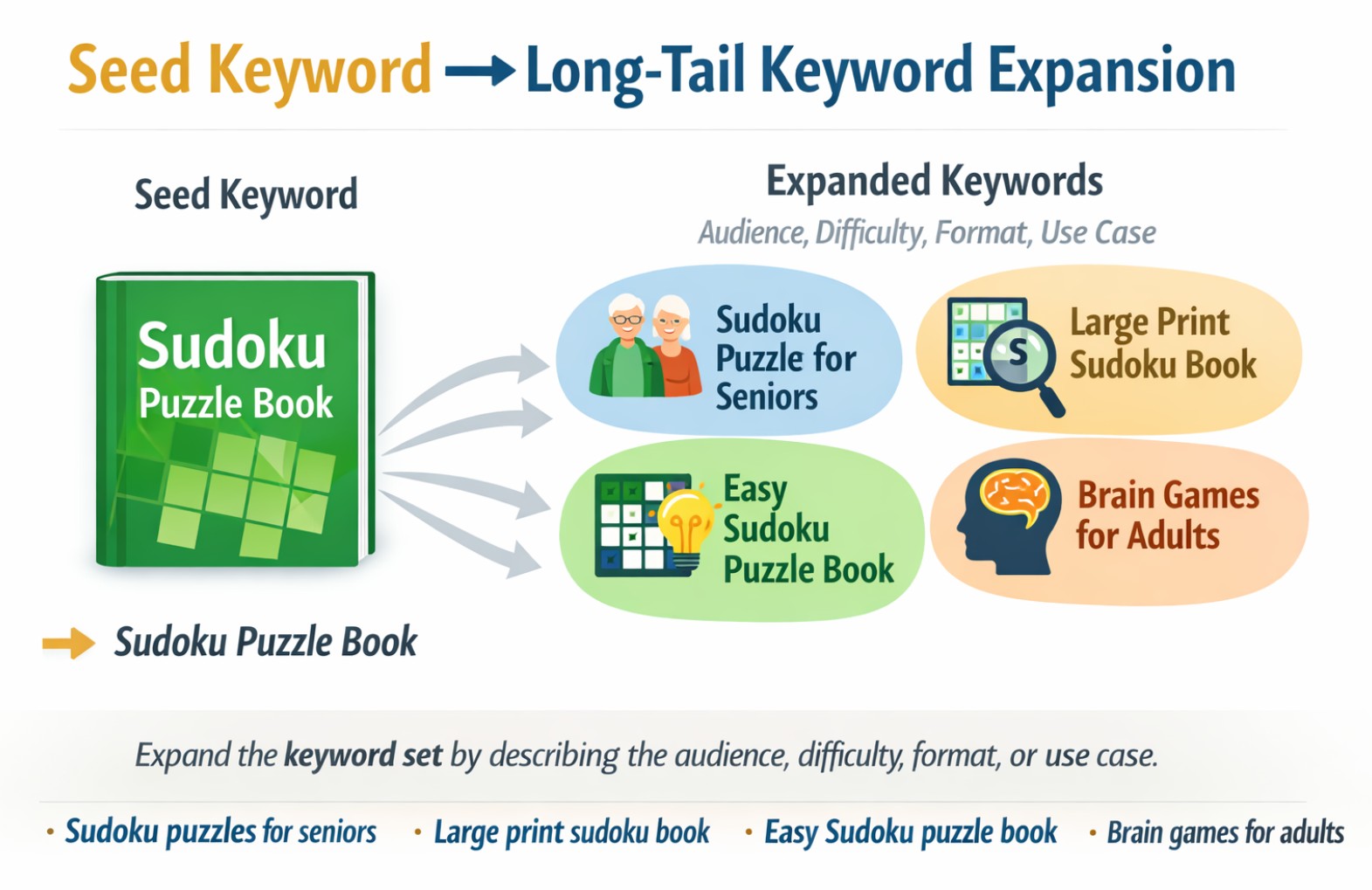
Seed Keyword → Long-Tail Keyword Expansion
Starting with one seed phrase, you can expand the keyword set by describing the audience, difficulty level, format, or use case.
Example expansions: sudoku puzzles for seniors, large print sudoku book, easy sudoku puzzle book, brain games for adults.
This type of expansion is exactly what AI keyword generators are designed to do. Instead of brainstorming manually, you can generate dozens of keyword variations based on your title and then shortlist the phrases that best match your book.
Negative Keywords and Irrelevant Searches to Avoid
When building a keyword list for Amazon KDP, it is just as important to think about which searches you do NOT want to target. Irrelevant keywords can confuse Amazon’s algorithm and may attract the wrong readers to your listing.
For example, if your book is a Sudoku puzzle book for adults, targeting keywords related to kids puzzles or math worksheets could bring traffic from readers who are not interested in your book. This can reduce conversion rates and weaken your search relevance over time.
- Unrelated audiences.
Avoid keywords that describe readers your book is not written for. Example: using “for kids” if your book targets adults. - Different formats.
If your book is a puzzle collection, keywords related to “workbooks”, “textbooks”, or “study guides” may attract the wrong audience. - Misleading promises.
Avoid keywords that imply results your book does not actually provide. - Trademarked or branded phrases.
Using brand names or franchise titles inside keywords can cause problems with Amazon policies and should generally be avoided.
Some keyword tools also generate negative keyword suggestions that help filter out irrelevant searches. This is especially useful when running Amazon Ads campaigns, where excluding unrelated queries can make targeting cleaner and more efficient.
Common Amazon KDP Keyword Mistakes Authors Make
Many authors struggle with Amazon keywords not because they lack ideas, but because they structure them incorrectly. Understanding a few common mistakes can dramatically improve how your book appears in search results.
Repeating Words Already in the Title
Amazon already indexes the words used in your book title. Repeating them inside backend keywords wastes valuable keyword space that could be used for additional phrases.
Using Single Generic Words
Broad terms like “puzzle”, “romance”, or “fitness” are extremely competitive and rarely help smaller books rank. Long-tail keyword phrases are usually much more effective.
Ignoring Reader Intent
Keywords should reflect how real readers search. For example, readers rarely search for “Sudoku”. They search for phrases like “easy sudoku book” or “large print sudoku puzzles for seniors”.
Keyword Stuffing
Filling backend fields with repeated or unnatural phrases does not improve ranking. Amazon's search system prefers clean keyword combinations that reflect real search queries.
The goal is not to add as many keywords as possible, but to create a focused keyword set that matches how readers actually search for books inside Amazon.
How to Build a Strong Amazon KDP Keyword List (Step by Step)
Finding good Amazon keywords is not about guessing random phrases. A strong keyword set usually starts with a clear core topicand then expands into audience, format, and use-case variations.
The process below is commonly used by authors when researching keywords for puzzle books, nonfiction, and many other KDP categories.
Step 1 — Identify the core topic of the book
Start with the main concept that defines the book. For example: sudoku puzzle book, gratitude journal, weight loss guide, or fantasy romance novel.
Step 2 — Add audience descriptors
Many Amazon searches include the reader type. Examples: for beginners, for seniors, for teens, for adults, or for kids.
Step 3 — Add format or style modifiers
Readers often search for specific formats such as large print, workbook, activity book, or guided journal.
Step 4 — Add difficulty or outcome
Describing the expected experience can create strong long-tail keywords. Examples include easy puzzles, advanced sudoku, beginner meditation guide, or productivity planner.
Step 5 — Combine the elements into natural phrases
Instead of isolated words, combine them into phrases that resemble real searches, such aseasy sudoku puzzles for seniors orgratitude journal for women.
AI keyword generators help automate this process by expanding a seed topic into dozens of natural long-tail keyword phrases that match how readers actually search on Amazon.
Example Amazon KDP Keyword Sets for Different Book Types
To better understand how keyword expansion works, it helps to look at real examples. Below are simplified keyword sets that illustrate how authors often combine topic, audience, and format modifiers to create searchable phrases.
| Book Type | Seed Topic | Example Long-Tail Keywords |
|---|---|---|
| Sudoku Puzzle Book | sudoku puzzle book | easy sudoku puzzles for seniors large print sudoku puzzle book brain games for adults sudoku beginner sudoku puzzle book |
| Gratitude Journal | gratitude journal | gratitude journal for women daily gratitude journal prompts mindfulness gratitude journal self reflection journal |
| Self-Help Book | confidence self help | confidence building for women self confidence workbook for adults overcome self doubt guide personal growth mindset book |
| Kids Activity Book | activity book for kids | activity book for kids ages 4-6 preschool learning activity workbook tracing and puzzle book for toddlers kindergarten activity book |
These examples illustrate how a simple topic can expand into multiple long-tail phrases that describe the audience, difficulty level, format, or use case. The goal is to create keyword combinations that resemble real Amazon search queries rather than isolated words.
Where Amazon Uses Keywords in Your Book Listing
Amazon’s search system does not rely on a single keyword field. Instead, it analyzes multiple parts of your book listing to understand what the book is about and when it should appear in search results.
Understanding where keywords are indexed helps authors structure their listing more effectively and avoid wasting keyword space.
Book Title
Words used in the title are strongly indexed by Amazon search. This is why many successful KDP titles include the core topic and sometimes the main audience directly in the title itself.
Subtitle
The subtitle allows authors to include additional descriptive phrases such as benefits, outcomes, or audience signals that may not fit inside the main title.
Book Description
While descriptions are primarily written for readers, they also reinforce keyword relevance by naturally mentioning the book topic, themes, and audience.
Backend Keywords
Amazon KDP allows authors to add additional search terms that are not visible to readers. These fields are often used to include alternative phrases, synonyms, and long-tail keywords.
A strong Amazon listing usually combines these elements: a clear title, a descriptive subtitle, a natural description, and carefully selected backend keywords that expand the search coverage.
Amazon KDP Keyword Rules Every Author Should Know
When publishing a book on Amazon KDP, authors can add backend keywords that help the book appear in search results. However, Amazon has specific rules for how these keywords should be written and formatted.
Understanding these rules helps you avoid wasted keyword space and increases the chance that your book will be indexed for relevant searches.
| Rule | Explanation |
|---|---|
| Use keyword phrases, not single words | Amazon indexing works best with natural search phrases such as “easy sudoku puzzles for seniors” instead of isolated words like “sudoku”, “easy”, “senior”. |
| Avoid repeating words | Repeating the same word across multiple keyword fields wastes space. Amazon already combines words internally when matching search queries. |
| Do not repeat title or subtitle words | Words used in the title and subtitle are already indexed. Backend keywords should focus on additional phrases that expand your search coverage. |
| Use spaces instead of commas | Amazon recommends separating keywords with spaces rather than punctuation. This allows the search system to combine words more flexibly. |
| Avoid misleading or irrelevant keywords | Keywords should accurately describe the book’s content. Using unrelated keywords can reduce listing quality and may violate Amazon guidelines. |
| Use all available keyword space | Each keyword field has a character limit. It is usually beneficial to use the available space to include relevant long-tail phrases rather than leaving it empty. |
Following these rules helps authors build a clean and efficient keyword structure that supports Amazon search visibility without keyword stuffing or duplication.
Common Amazon KDP Keyword Mistakes Authors Make
Many authors add backend keywords quickly without thinking about how Amazon search actually interprets them. This often leads to wasted keyword space and weak discoverability.
Avoiding the following common mistakes can significantly improve how your book appears in Amazon search results.
Repeating the Same Words
Many authors repeat words like “book”, “guide”, or “puzzle” across multiple keyword fields. Amazon already combines words internally, so repeating them wastes valuable space that could be used for new search phrases.
Using Keywords Already in the Title
Words used in the title and subtitle are already indexed by Amazon search. Adding the same words again in backend keywords does not improve ranking and simply reduces the number of additional phrases you can include.
Choosing Very Broad Keywords
Generic words like “book”, “novel”, or “puzzles” are extremely competitive and rarely help with discoverability. Long-tail phrases that include audience or topic signals usually perform better.
Adding Irrelevant Search Terms
Some authors try to rank for popular keywords that are not related to the book. This can confuse Amazon’s indexing system and may reduce listing quality instead of improving visibility.
A well-structured keyword strategy focuses on relevance, clarity, and long-tail search phrases that match how real readers search on Amazon.
How to Find Amazon KDP Keywords for Your Book (Step-by-Step)
Finding strong keywords for your Amazon KDP listing does not require complex tools. Most keyword ideas can be discovered by understanding how readers describe books when they search on Amazon.
The process usually starts with a simple topic and gradually expands into more specific search phrases that include audience signals, format details, and problem-solution intent.
1. Start with a Seed Topic
Begin with the main topic of the book. For example, “sudoku puzzle book”, “gratitude journal”, or “confidence self help”. This seed phrase becomes the starting point for keyword expansion.
2. Add Audience Signals
Many Amazon searches include audience indicators such as “for seniors”, “for kids ages 4-8”, “for women”, or “for beginners”. These signals help match the right readers with the book.
3. Include Format or Difficulty
Readers often search using format modifiers such as “large print”, “workbook”, “activity book”, or difficulty signals like “easy”, “beginner”, or “advanced”.
4. Observe Amazon Autocomplete
When typing in Amazon search, the autocomplete suggestions reveal real phrases that readers search for frequently. These suggestions often provide valuable keyword ideas.
5. Build Long-Tail Keyword Phrases
Combine the topic, audience, and format modifiers into longer phrases such as “easy sudoku puzzles for seniors” or “gratitude journal for women with prompts”. These long-tail phrases usually have clearer search intent and lower competition.
This step-by-step expansion approach helps authors move from a simple topic idea to a full set of keyword phrases that reflect how readers actually search for books on Amazon.
How Many Keywords Should an Amazon KDP Book Use?
Amazon does not require authors to submit a fixed number of keywords, but the platform provides several places where keyword signals can appear in a book listing. Instead of focusing on a single keyword field, it is better to think in terms of a complete keyword structureacross the entire listing.
The goal is not to repeat the same words everywhere, but to distribute related phrases across the title, subtitle, description, and backend keyword fields so Amazon can clearly understand the topic of the book.
| Listing Element | Keyword Role |
|---|---|
| Book Title | Usually contains the main topic keyword that defines what the book is about. This is one of the strongest signals Amazon uses for indexing. |
| Subtitle | Expands the main topic with audience or benefit signalssuch as “for beginners”, “for seniors”, or “step-by-step guide”. |
| Book Description | Reinforces keywords naturally by describing the topic, audience, and outcomes of the book in full sentences. |
| Backend Keyword Fields | Used for additional search phrases, synonyms, and long-tail keyword combinations that do not appear in the visible listing. |
A balanced keyword strategy usually includes a strong topic keyword, several long-tail variations, and audience-focused phrases that match how readers naturally search for books on Amazon.
Keyword Examples by Book Type (Realistic Amazon Search Phrases)
Below are simplified examples of how keyword clusters often look in real Amazon searches. These are not meant to be copied blindly — they show the structure of strong long-tail phrases built around topic, audience, format, and use case.
Puzzle & Activity Books (Medium Content)
Readers usually add audience + difficulty + format modifiers.
Examples: easy sudoku puzzles for seniors, large print sudoku puzzle book, crossword puzzle book for adults, cryptogram puzzles for adults, brain games for adults large print.
Self-Help & Personal Growth
Keywords often reflect problems, outcomes, or transformation goals.
Examples: overcome anxiety workbook, build confidence for women, habit tracker workbook, self discipline guide, mindset for success book.
Journals, Planners & Workbooks
Searches often include use-case context and daily routine language.
Examples: daily gratitude journal prompts, guided journal for women, productivity planner for busy people, weekly meal planner notebook, goal setting workbook.
Kids Books & Learning Workbooks
Keywords usually include age range + skill + format.
Examples: activity book for kids ages 4-6, preschool learning workbook, tracing letters workbook for kids, math workbook grade 3, kindergarten readiness activities.
The strongest keyword lists usually mix several clusters like these so Amazon can match your book to multiple relevant search angles — without stuffing or repeating the same words everywhere.
FAQ: Amazon KDP Keywords and Book Discoverability
- How many keywords can I add in Amazon KDP?
Amazon KDP provides 7 backend keyword fields. Each field allows roughly 50 characters, so authors usually enter short keyword phrases rather than single words. - Should I repeat keywords in multiple fields?
No. Amazon search already combines words internally. Repeating the same words across keyword fields wastes space that could be used for additional long-tail phrases. - Do backend keywords affect Amazon rankings?
Backend keywords help Amazon understand what your book is about and when it should appear in search results. However, rankings also depend on other signals such as sales, conversion rate, and reader reviews. - Are long-tail keywords better for Amazon KDP?
Yes. Long-tail phrases such as easy sudoku puzzles for seniorsusually reflect clearer reader intent and often face lower competition than broad keywords like “puzzles”. - Do keywords in the description help indexing?
Yes. While the description is written primarily for readers, it also reinforces keyword relevance by naturally mentioning the topic, audience, and benefits of the book.
Continue Optimizing Your Amazon Book Listing
Keywords help readers discover your book in Amazon search, but they work best when the entire listing is optimized together. A strong title, clear description, and the right categories reinforce the same topic signals and help Amazon understand who the book is for.
AI Book Title Generator
Create title and subtitle combinations designed to communicate the core topic, audience, and benefit of your book.
Generate structured title ideas that align with Amazon search phrases and reader expectations.
AI Book Description Generator
Write structured book descriptions using proven marketing frameworks such as benefit-driven, story-based, or problem–solution formats.
Generate multiple description variations and choose the version that best communicates the value of your book to potential readers.
AI Category Finder
Discover relevant Amazon browse categories for Kindle and paperback books.
Choosing the right categories can improve your book’s visibility in niche shelves and help it reach the readers who are already searching for similar books.
When titles, descriptions, keywords, and categories work together, your book listing becomes easier for Amazon to understand and easier for readers to discover.