
How Amazon KDP Categories Affect Book Discoverability
Amazon KDP categories determine where your book appears inside the Amazon store and what other books it is compared against. When readers browse an Amazon browse category page, Amazon shows books that belong to that specific niche. If your category matches the topic and audience of your book, it becomes easier for the right readers to discover it.
Categories also influence how Amazon understands your book. They act as contextual signals that help the platform group similar titles together. When the category, title, and cover all communicate the same idea, Amazon can more confidently recommend the book to readers interested in that subject.
In practice, categories shape two important things: competition and visibility. The category you choose determines which books you compete with and how easily readers can find your listing while browsing Amazon.
How Amazon KDP Categories Actually Work
Amazon organizes books into a hierarchical browse category structure. Each category has its own shelf, its own ranking list, and its own level of competition. This means your book can rank very differently depending on which category path it appears in.
The Amazon Bestseller badge is awarded within a specific category. A book does not need to outsell the entire store — it needs to rank high inside that particular category’s competition level. That’s why relevant niche categories can sometimes produce a Bestseller label with fewer sales than broad categories.
Also note: Kindle and Paperback can surface in different browse paths. When you research categories, always validate placement by checking real books already ranking in the category page you’re targeting.
How a Category Finder Helps You Discover Better Placement
Finding the right Amazon categories often requires research. Authors usually explore multiple category pages, analyze the books already ranking there, and try to understand where their book naturally fits. This process can take time, especially when a book could belong to several related niches.
A category finder helps speed up this discovery process. Instead of manually browsing dozens of category pages, the tool suggests realistic category paths based on the title of your book. These suggestions highlight possible niches, audience angles, and positioning options you may want to explore.
The goal is not to choose categories for you. The goal is to help you discover realistic Amazon browse paths faster, so you can shortlist the most relevant options and validate them by reviewing real books already ranking there.
Example: How the Right Category Can Help a Book Earn the Amazon Bestseller Badge
On Amazon, every category has its own level of competition. Broad categories contain thousands of books and usually require very strong sales to reach the top positions. Smaller niche categories often require far fewer sales, which means the same book can perform very differently depending on where it is placed.
This is why category research matters. By finding a category that is both relevant to the book and less crowded, a book with moderate sales can sometimes reach the top positions and receive the Amazon Bestseller badge.
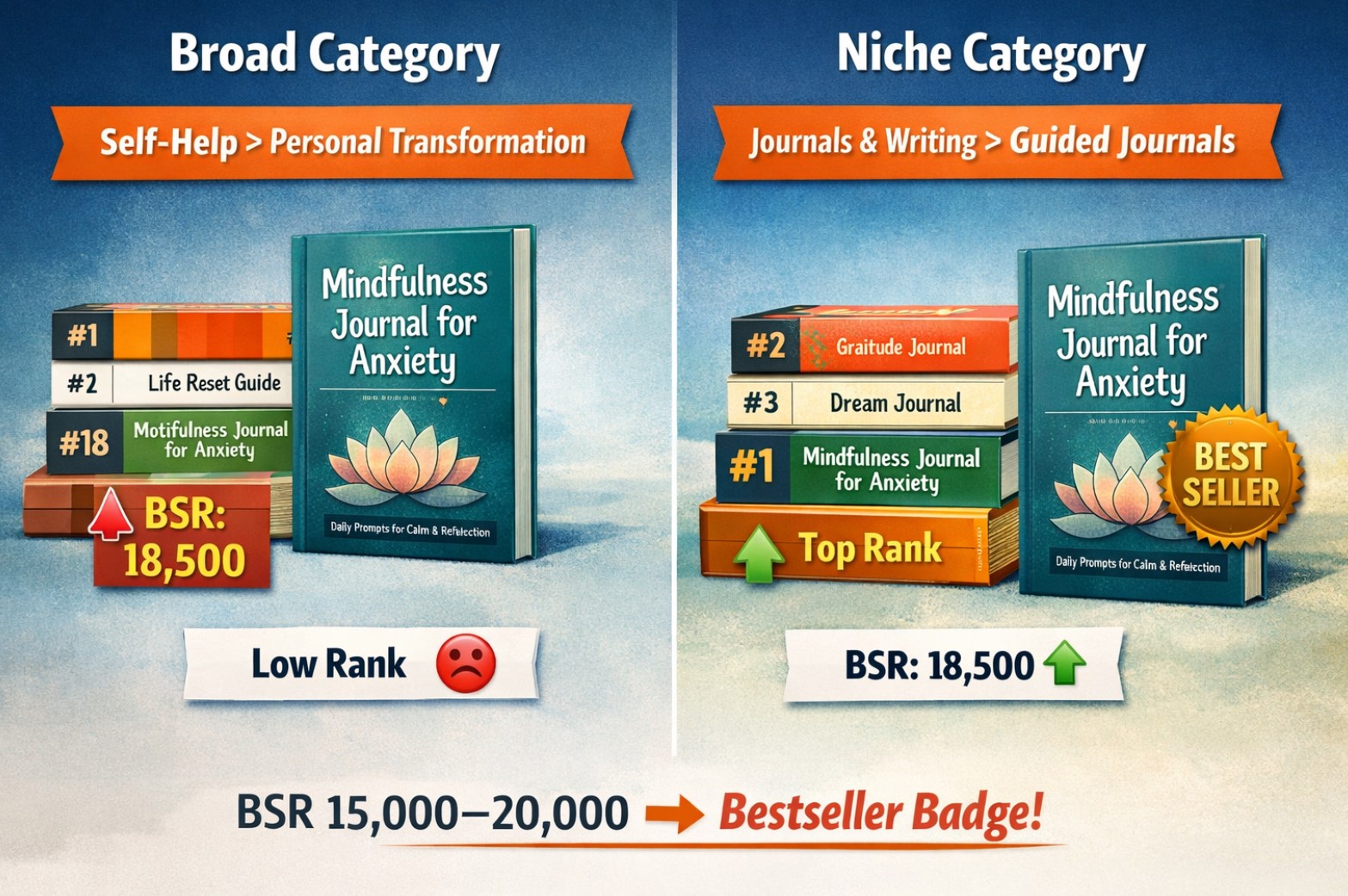
Same Book → Different Category Outcome
A book about anxiety journaling might compete in a broad category like Self-Help or in a more focused niche like Guided Journals.
Example scenario: with a BSR around 15,000–20,000, the book may rank low in a large category but could reach the top positions in a relevant niche category and receive the Bestseller badge.
When a book earns the Bestseller label inside a relevant category, it often gains more visibility and reader trust. The badge is category-specific, so results depend on the competition level of that shelf. Even a moderate increase in clicks and conversions can raise sales by 20–30% over time. Tools like a category finder help you discover these realistic category options faster before validating them directly on Amazon.
Use the Category Finder to Explore Better Amazon Category Options
Discovering the right categories manually can take time. Authors often browse multiple Amazon category pages, compare competing books, and evaluate whether their book naturally fits a particular niche. When a book could belong to several related categories, this research becomes even more complex.
The AI Category Finder helps simplify this process. Kindle and Paperback can surface different browse paths, so choose the format you plan to publish first. By analyzing your book title, it suggests realistic Amazon browse paths that may match your topic, audience, or positioning angle. Instead of guessing categories from scratch, you can start with a set of relevant ideas and evaluate them directly on Amazon.
Use the suggestions as a starting point for research. Review the books already ranking in each category, compare their covers and positioning, and choose the category where your book naturally belongs. The best category is the one where readers immediately understand why your book fits there.
Continue Optimizing Your Amazon Book Listing
Categories help Amazon understand where your book belongs and what readers should expect, but they work best when the entire listing supports the same topic signals. When your title, description, keywords, and categories reinforce one clear angle, your book becomes easier to discover—and easier to trust at a glance.
AI Book Title Generator
Create clear title and subtitle options that communicate your niche, audience, and promise in a way that fits Amazon browsing and search behavior.
Strong titles set expectations fast and help readers self-select before they even open the description.
AI Book Description Generator
Draft structured blurbs using proven frameworks (benefit-first, story-first, or problem–solution) and refine the version that best matches your category shelf.
A clear description increases conversion by showing what’s inside and why it matters—without sounding like hype.
AI Book Keyword Generator
Discover long-tail keyword phrases readers actually type into Amazon search and expand your listing’s coverage across multiple search angles.
Keyword research works best when it matches your category positioning and supports the same audience intent.
When your categories, title, description, and keywords point to the same reader intent, Amazon can place your book more confidently—and readers are more likely to click and buy.
Amazon categories are not just technical settings — they shape how readers discover and interpret your book. The right category helps your listing appear in the right context, compete with the right books, and reach the readers most likely to value it. Use the Category Finder to explore realistic category options faster, then validate them on Amazon to choose the best placement for your book.